# Troubleshooting
Source: https://docs.privacytracker.privacykey.org/troubleshooting
Common issues self-hosters hit, with diagnostics and fixes.
If you don't see your problem here, the support bundle has more context: Settings → Admin → Deployment Diagnostics → Copy support bundle. Paste it into a [GitHub issue](https://github.com/privacykey/privacytracker/issues).
## App Store labels stopped parsing
**Symptoms:** New apps import without error but show no privacy categories. Existing apps that re-sync get a snapshot with `category_count = 0`.
**Most likely cause:** Apple changed the HTML shape of the App Store page. The parser has a four-layer fallback chain (`shelfMapping.privacyTypes.items` → `privacyHeader.seeAllAction.pageData.shelves` → generic `pageData.shelves` → `extractFromShoebox` for the historical Ember/FastBoot `shoebox-media-api-cache-apps` shape), but Apple has shipped breaking changes several times — they may do it again.
**Diagnose:**
```bash
# Check whether the modern Nov-2025+ envelope is present
curl -s 'https://apps.apple.com/us/app//id' \
| grep -o 'serialized-server-data' | head -1
# Should print exactly: serialized-server-data
# If the modern envelope is missing, check whether the legacy
# Ember/FastBoot shoebox is present instead — this is the fallback
# the parser uses for archive.org captures from Jan 2021 to Nov 2025.
curl -s 'https://apps.apple.com/us/app//id' \
| grep -o 'shoebox-media-api-cache-apps' | head -1
# Should print: shoebox-media-api-cache-apps (historical pages only)
```
If neither marker is present, Apple changed the page envelope altogether. If a marker is present but `category_count` is still 0 after a re-sync, one of the layouts changed shape internally.
**Fix:** Open an issue with the support bundle and the app's bundle ID. The parser change is usually a 5–30 line update in `lib/scraper.ts` once we have a known-broken example. The four-fallback chain absorbs most schema drift without code changes; intervention is only required when a wholly new envelope ships.
## Privacy-policy link not detected
**Symptoms:** App page shows labels but the developer privacy-policy link doesn't render and AI summaries don't trigger.
**Cause:** Apple's "Developer's Privacy Policy" aria-label sometimes uses a curly apostrophe (`'`) instead of a straight one (`'`). The regex handles both, but bespoke locale-specific labels may not match.
**Diagnose:**
```bash
# In your data dir, check the policy URL column
sqlite3 data/privacy.db "SELECT id, name, privacyPolicyUrl FROM apps WHERE id = ;"
```
If `privacyPolicyUrl` is `NULL` and the app's App Store page does have a policy link, that's the apostrophe (or another locale-specific aria-label) bug.
**Workaround:** Add the policy URL manually in **Settings → Apps → \ → Edit policy URL**, or open an issue with the App Store URL so the regex can be widened.
## Docker container exits immediately
**Symptoms:** `docker compose up` brings the container up, then it dies with exit code 1 within a few seconds.
**Diagnose:**
```bash
docker compose logs --tail 50
```
The most common error says the database file can't be opened (`unable to open database file`).
**Fix:** With the default Compose file the database is in a Docker-managed volume, which the container's user can always write. The error comes from the bind-mount file (`docker-compose.bind-mount.yml`) when `./data` on the host isn't owned by the container's user, `audit` (UID 100, GID 101). Docker creates a missing bind source as `root`, so create it first:
```bash
mkdir -p data && sudo chown 100:101 data
docker compose -f docker-compose.yml -f docker-compose.bind-mount.yml up --build -d
```
If you're running on SELinux (e.g. Fedora), add `:Z` to the volume mount in `docker-compose.bind-mount.yml` so the host directory gets the right context.
If `docker compose up` stops before starting anything with `required variable AUDITOR_ADMIN_TOKEN is missing a value`, add a token to `.env` first (see [Installation → Docker](https://docs.privacytracker.privacykey.org/installation)).
## `/api/ready` returns `not_ready`
**Diagnose:**
```bash
curl -i http://localhost:3000/api/ready
# HTTP/1.1 503 Service Unavailable
# {"status":"not_ready","checks":{...}}
```
A ready instance answers 200 with `{"status":"ready"}`. Two things are checked: SQLite reachability and data-directory writability. The `checks` object names which failed.
| Failure | Meaning | Fix |
|---|---|---|
| Database unreachable | The process can't open `privacy.db` | Check no stale process holds the file; `chmod 644 data/privacy.db`; on Docker, confirm the volume mounted (`docker compose exec web ls -la /app/data`) |
| Data directory not writable | The data directory itself isn't writable | `chmod 755 data`; on Docker, confirm the volume isn't mounted read-only |
If the process was force-killed, don't delete the `-wal` or `-shm` file it left behind. SQLite replays the WAL the next time it opens the database, so deleting it discards every transaction that was committed to it but not yet checkpointed. A lock held by a process that has died is released by the OS on its own.
## AI summaries never appear
**Symptoms:** AI provider is configured, the test in **Settings → AI → Test connection** passes, but summaries on app detail pages stay empty.
**Diagnose:** Turn on *Record AI prompts and responses*, then open the AI debug log under **Settings → Admin → Developer Options**. Recent calls show provider, model, prompt size (chars), response status, and timing.
| Symptom in the log | Cause | Fix |
|---|---|---|
| `policy text empty (skipped)` | Policy URL didn't return text | Confirm the URL works in a browser; the privacy-policy fetcher honours `User-Agent` and follows redirects but won't bypass paywalls |
| `policy hash unchanged (skipped)` | The doc didn't actually change since the last run | Expected — summarisation only runs when the SHA-256 of the policy text changes |
| `request timeout` | Provider didn't respond within the configured timeout | Increase **Settings → AI → Timeouts** (the small/local model preset is more generous); for Ollama, make sure the model is pre-pulled (`ollama pull llama3.2`) |
| `chunked: 6 of 6, partial output` | A chunk failed mid-document | Re-run **Regenerate** on the app; chunking is idempotent |
| `model not found` | Selected model isn't available on the provider | Re-run **Settings → AI → Fetch models** to refresh the dropdown |
For local models, the `providerLikelyNeedsChunking` flag automatically splits documents over ~12 KB into chunks. If your model has a larger context window, you can disable this in `lib/ai-config.ts` (source builds only).
## Reverse-proxy CSRF rejection
**Symptoms:** Self-hosted behind Caddy/Traefik/Nginx; reads work but every mutation (`POST`, `PUT`, `DELETE`) returns 403 with `{"error":"Cross-origin mutation rejected"}`.
**Cause:** privacytracker enforces a same-origin CSRF check on every destructive route by comparing `Origin` against `Host`. If your proxy rewrites either header, the check fails.
**Fix:** Forward the original `Host` header. Sample Caddy snippet:
```caddyfile
reverse_proxy localhost:3000 {
header_up Host {host}
header_up X-Real-IP {remote_host}
}
```
Sample Traefik label:
```yaml
- "traefik.http.middlewares.privacytracker-headers.headers.customRequestHeaders.Host=privacytracker.local"
```
Complete Compose stacks ship in the main repo under `deploy/caddy/` and `deploy/traefik/` — start from those if you have a checkout.
**If reads fail too,** with 400 `{"error":"Host not allowed"}`, this is a different check: the Host allowlist, which defaults to loopback only. Add your proxy's hostname to `PRIVACYTRACKER_ALLOWED_HOSTS` — see [Configuration → Network exposure](https://docs.privacytracker.privacykey.org/configuration#network-exposure).
## Wayback import: "skipped, no capture"
**Symptoms:** `POST /api/wayback/import-all` finishes with most quarters reporting `skipped_no_capture`.
**Cause:** archive.org has no capture for that App Store URL within the ±42-day tolerance window around the quarter target. This is normal for niche apps and recent quarters.
**What the importer does about it:** When a quarter has nothing in tolerance, the importer fires a `submitToWaybackSaveNow(app.url)` request fire-and-forget so a future run can pick it up. Each app submits at most once per run; the count shows up as `snapshotsRequested` in the result.
**Fix:** Re-run the import in 1-2 weeks. Wayback typically takes a few days to process Save-Page-Now requests, and the importer will pick up newly-archived captures on the next pass.
## Migration error on startup
**Symptoms:** App boots into an error screen reading "Migration step `` failed: …" with an Attempt counter and a Try again button.
**Diagnose:** The error message names the failing step. The six steps run in order and each is idempotent:
1. `schema_check` — verify `feature_flag_overrides` and the other new tables exist
2. `user_intent_migration` — map old `user_intent` to new focus keys
3. `notification_prefs_absorb` — flatten the old JSON blob into per-type rows
4. `callout_rename` — drop stale override rows for renamed keys
5. `quarantine_check` — flag overrides whose keys are unknown to this version
6. `focus_goal_rename` — move `flag.focus.goal.understand` / `.declutter` onto `.monitor` / `.cleanup`
**Fix:** Tap **Try again** — most failures are transient (file lock, slow disk). Up to 3 retries are offered; after that, the screen surfaces a **Reset DB** option that wipes `data/privacy.db` and routes you to onboarding. Take a backup first if you have anything you don't want to lose:
```bash
cp data/privacy.db data/privacy.db.before-reset
```
## The app's layout looks wrong after I changed focus or a flag
**Symptoms:** After adjusting your focus or toggling something under **Settings → Developer Options → Feature flags**, a surface is missing, stuck collapsed, or shows the wrong controls.
**Cause:** A feature-flag override — or the combination of your current audience + goals — is resolving to something you didn't intend. Overrides are explicit and sticky; they persist until you clear them.
**Fix — least drastic first:**
1. **Reset one flag.** In **Settings → Developer Options → Feature flags**, find the flag and clear its override. It falls back to the computed default for your current focus.
2. **Flip the kill-switch.** If several flags are tangled, set `flag.devopts.feature_flag_system.enabled` to **off** on the same Developer Options screen. This collapses *every* flag to its hard default without touching your focus, apps, or notes. Turning it back **on** re-engages your audience/goals and any overrides — no data is lost either way.
If the layout is still wrong after the kill-switch, it isn't a flag problem — grab the support bundle (**Settings → Admin → Deployment Diagnostics**) and open an issue.
## Sync stuck "running"
**Symptoms:** The TaskCenter or **Settings → Sync** shows a sync running for hours; `GET /api/tasks/active` reports `running: true` but no progress.
**Cause:** A previous run was killed mid-flight and the `sync_running` mutex never cleared. The boot-time resume probe handles this on next process restart by either resuming the queue (if state is intact) or healing the lock (if state is gone) — but if you're still on the same boot, the lock stays held.
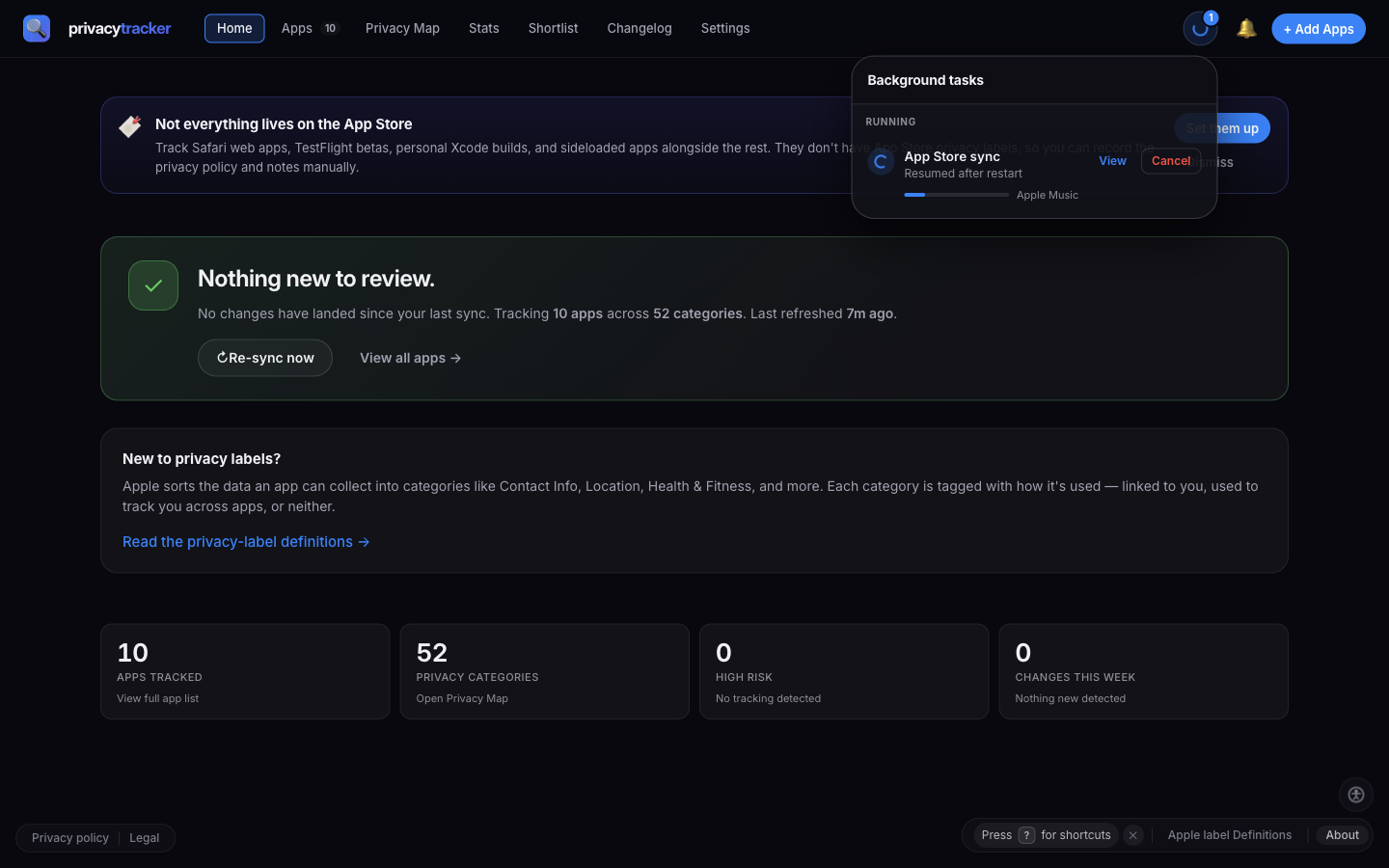
*TaskCenter showing a resumed App Store sync*
**Fix:** Restart the process. On boot, `instrumentation.ts` runs three staggered resume checks (8s / 10s / 12s) — for each of `sync_running`, `wayback_import_running`, and `policy_sync_running`, it does one of:
- **Nothing pending** → no-op
- **Mutex held but no queue** → clear the lock and raise a `*_stale_cleared` notification
- **Queue pending** → notify and resume with `initiator: 'resume'`
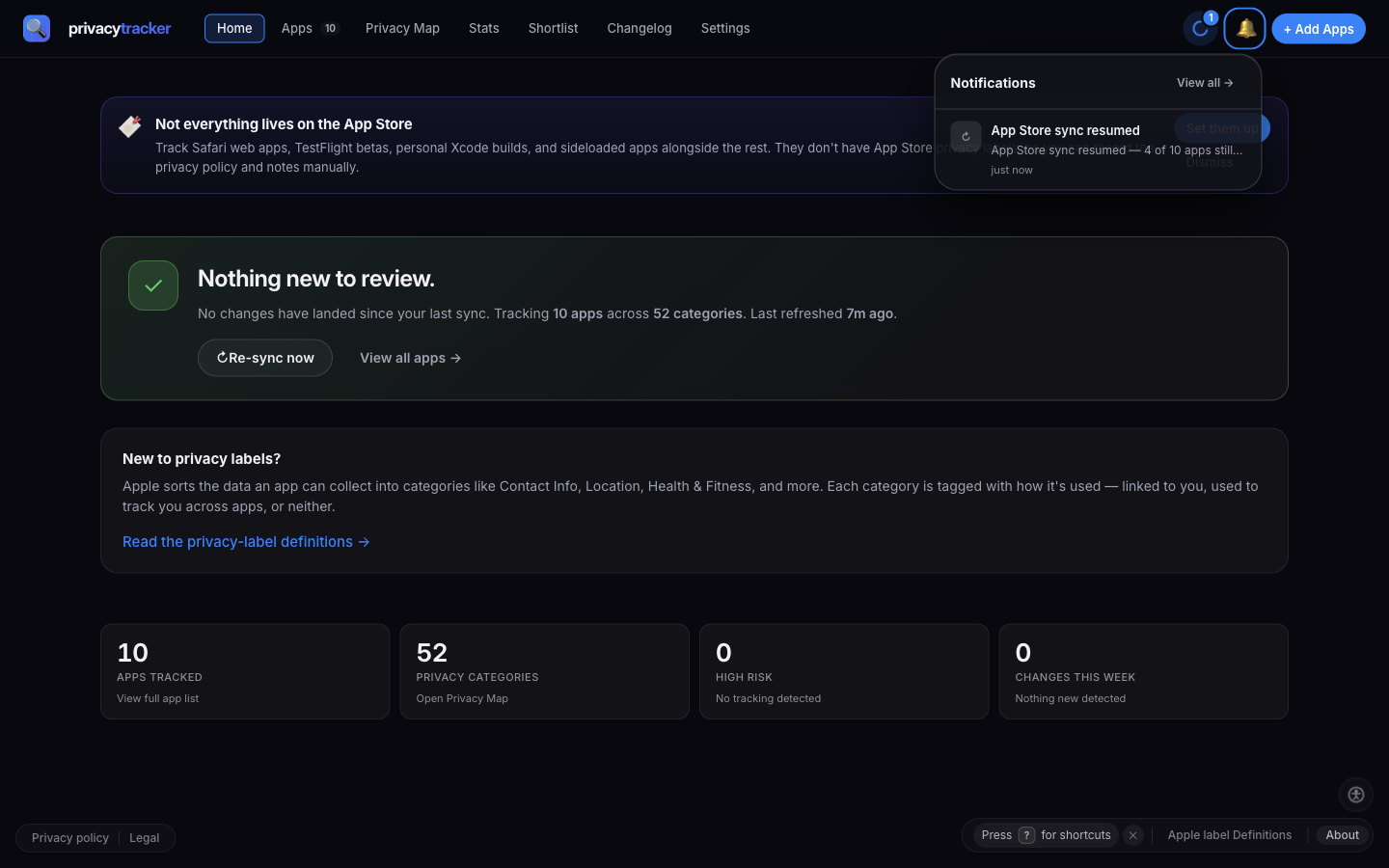
*Resume notification in the bell*
If a restart doesn't help, you can manually clear the lock:
```bash
sqlite3 data/privacy.db "DELETE FROM app_settings WHERE key IN ('sync_running','wayback_import_running','policy_sync_running');"
```
Then restart. This is safe — the worst case is one app's worth of duplicate work on the next run, which the per-target dedup absorbs.
## 429 from App Store
**Symptoms:** Bulk sync logs report `partial: rateLimited` and stop early.
**Cause:** Apple rate-limited the IP. The runner is tuned to bail cleanly on the first 429, record a `partial` activity row, and clear state + mutex so the next 30-minute scheduler tick can retry fresh.
**Fix:** Wait 30+ minutes and the scheduled tick will retry automatically. If you hit 429 repeatedly, switch **Settings → Sync → Schedule** from `daily` to `weekly`, or stagger your apps across multiple manual runs. `daily` is the fastest cadence there is — the 30-minute figure is the ticker interval, not a schedule option.
If the 429s keep coming, set the schedule to `manual`. A rate-limited exit deliberately doesn't stamp `last_auto_sync`, so the run stays "due" and the ticker retries every 30 minutes regardless of whether you picked `daily` or `weekly`. Only `manual` stops that loop.
## Where to ask for help
- **GitHub Issues:** [github.com/privacykey/privacytracker/issues](https://github.com/privacykey/privacytracker/issues) — bug reports and feature requests use the `bug_report.yml` template and benefit from a copied support bundle (**Settings → Admin → Deployment Diagnostics**)
- **Security:** [GitHub Private Vulnerability Reporting](https://github.com/privacykey/privacytracker/security/advisories/new) — never open a public issue for a security finding